 Back to articles
Effect · Practical guide
How to use Effect with everything
A simple guide for bringing outside code into Effect and meeting the expected entry point contract.
The three-part map
Effect offers a lot, and bringing it into an existing app can feel like an all-or-nothing decision. It does not have to be. Start by wrapping one piece of work as an Effect. You can combine it with other work before you run it. That gives you a place to express failures and dependencies.
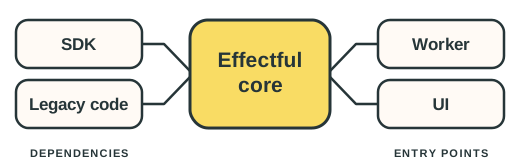
The question is how that piece fits into code that does not use Effect. Think of your code in three parts:
| Part | What lives there | Your job there |
|---|---|---|
| Dependency boundaries | Outside operations your feature calls, such as an SDK or legacy code that you're not ready to migrate to Effect | Wrap each operation as an Effect. |
| Effectful core | The new feature code you control, written in Effect | Keep as much of the feature here as possible. |
| Entry-point boundaries | Code a framework calls, such as an HTTP handler or React component | Supply dependencies, translate failures, and run the Effect. |
These are responsibilities, not the order in which code runs. Work starts at an entry point, may use several dependencies, and returns a result to its caller. You can have many boundaries on both sides of the same core.
We will build a feature that summarises meeting notes. An OpenAI SDK call will show a dependency boundary, the summary workflow will live in the Effectful core, and Cloudflare and React will show two different entry points.
Dependency boundaries: bring code you call into Effect
At this boundary, you control the wrapper, even when you do not control the code it calls. Look at the outside operation first:
| Outside operation | Bring it into the feature with |
|---|---|
A pure calculation, such as notes.trim() | Use notes.trim() directly. |
A synchronous action, such as performance.now() | Effect.sync(() => performance.now()) |
A synchronous call that may throw, such as JSON.parse(text) | Effect.try(() => JSON.parse(text)) |
A Promise that may reject, such as client.responses.create(params) | Effect.tryPromise({ try: () => client.responses.create(params), catch: (cause) => new OpenAIResponseCreateError({ cause }) }) |
Wrapping a call delays it until the Effect runs. A Promise's return type does not guarantee success. Unless you know it cannot reject, give each Promise you wrap an error named for that operation. The catch callback in Effect.tryPromise keeps the original rejection as the error's cause:
import OpenAI from 'openai'
import { Data, Effect } from 'effect'

class OpenAIResponseCreateError extends Data.TaggedError('OpenAIResponseCreateError')<{
  cause: unknown
}> {}

const createResponse = (
  client: OpenAI,
  params: OpenAI.Responses.ResponseCreateParamsNonStreaming,
) =>
  Effect.tryPromise({
    try: () => client.responses.create(params),
    catch: (cause) => new OpenAIResponseCreateError({ cause }),
  })
When several operations come from the same SDK, you can group their wrappers in a service. This also lets you replace them in tests:
import { Context } from 'effect'

class OpenAIService extends Context.Service<
  OpenAIService,
  {
    createResponse: (
      params: OpenAI.Responses.ResponseCreateParamsNonStreaming,
    ) => Effect.Effect<OpenAI.Responses.Response, OpenAIResponseCreateError>
  }
>()('OpenAIService') {}
A layer supplies the service's implementation. Creating the SDK client can throw, so the layer gives that failure a different error from the Promise rejection:
import { Layer } from 'effect'

class OpenAIClientCreationError extends Data.TaggedError('OpenAIClientCreationError')<{
  cause: unknown
}> {}

const openAIServiceLayer = (apiKey: string) =>
  Layer.effect(
    OpenAIService,
    Effect.gen(function* () {
      const client = yield* Effect.try({
        try: () => new OpenAI({ apiKey }),
        catch: (cause) => new OpenAIClientCreationError({ cause }),
      })

      return OpenAIService.of({
        createResponse: (params) => createResponse(client, params),
      })
    }),
  )
The same approach works for legacy code. If readSavedNotes() throws, wrap the call with Effect.try and name its failure. The function itself can stay as it is.
Effectful core: the home for your application logic
Now we can write the feature logic in Effect. Effect.gen lets us combine the steps in order. yield* uses an Effect, including a service or a failure, without running the whole program:
class EmptyNotesError extends Data.TaggedError('EmptyNotesError')<{}> {}
class EmptySummaryError extends Data.TaggedError('EmptySummaryError')<{}> {}

const summariseNotes = (notes: string) =>
  Effect.gen(function* () {
    const input = notes.trim()
    if (!input) return yield* new EmptyNotesError()

    const openAI = yield* OpenAIService
    const response = yield* openAI.createResponse({
      model: 'gpt-5.4-mini',
      instructions: 'Summarise these notes in three concise bullet points. Do not invent details.',
      input,
    })

    const summary = response.output_text.trim()
    if (!summary) return yield* new EmptySummaryError()
    return summary
  })
summariseNotes returns an Effect. It leaves supplying the service, handling failures, and running the work to an entry point.
Entry-point boundaries: meet the caller's contract
At an entry point, a runtime or framework decides what your code must return. A Cloudflare Worker handler returns a Response or Promise<Response>. A React component returns UI and can use hooks to update it when asynchronous work finishes.
At the boundaries, supply any services the feature needs, translate top-level failures for that caller, and run the Effect here.
A Cloudflare Worker request handler
The Worker's fetch handler reads the request body, calls the feature, and returns an HTTP response:
class CloudflareRequestBodyError extends Data.TaggedError('CloudflareRequestBodyError')<{
  cause: unknown
}> {}

type Env = { OPENAI_API_KEY: string }

export default {
  async fetch(request: Request, env: Env): Promise<Response> {
    const program = Effect.gen(function* () {
      const notes = yield* Effect.tryPromise({
        try: () => request.text(),
        catch: (cause) => new CloudflareRequestBodyError({ cause }),
      })

      const summary = yield* summariseNotes(notes)
      return new Response(summary)
    })

    const response = program.pipe(
      Effect.provide(openAIServiceLayer(env.OPENAI_API_KEY)),
      Effect.catchTags({
        CloudflareRequestBodyError: () =>
          Effect.succeed(new Response('Could not read notes', { status: 400 })),
        EmptyNotesError: () => Effect.succeed(new Response('Enter some notes', { status: 400 })),
        EmptySummaryError: () =>
          Effect.succeed(new Response('Summary unavailable', { status: 502 })),
        OpenAIResponseCreateError: () =>
          Effect.succeed(new Response('Summary unavailable', { status: 502 })),
        OpenAIClientCreationError: () =>
          Effect.succeed(new Response('Summary unavailable', { status: 502 })),
      }),
    )

    return Effect.runPromise(response)
  },
}
A React component
The browser's fetch call is another dependency boundary. Wrap it and the response body read as separate Promises with separate errors:
class SummaryRequestError extends Data.TaggedError('SummaryRequestError')<{
  cause: unknown
}> {}
class SummaryResponseBodyError extends Data.TaggedError('SummaryResponseBodyError')<{
  cause: unknown
}> {}
class SummaryHttpError extends Data.TaggedError('SummaryHttpError')<{
  status: number
}> {}

const requestSummary = (notes: string) =>
  Effect.gen(function* () {
    const response = yield* Effect.tryPromise({
      try: () => fetch('/api/summary', { method: 'POST', body: notes }),
      catch: (cause) => new SummaryRequestError({ cause }),
    })

    if (!response.ok) return yield* new SummaryHttpError({ status: response.status })

    return yield* Effect.tryPromise({
      try: () => response.text(),
      catch: (cause) => new SummaryResponseBodyError({ cause }),
    })
  })
Suppose a page passes meeting notes to a summary component. When it appears, React's useEffect callback runs the program:
import { Effect, Match } from 'effect'
import { useEffect, useState } from 'react'

type SummaryResult =
  | { status: 'loading' }
  | {
      status: 'ready'
      summary: string
    }
  | {
      status: 'error'
      message: string
    }

function SummaryPreview({ notes }: { notes: string }) {
  const [result, setResult] = useState<SummaryResult>({ status: 'loading' })

  useEffect(() => {
    setResult({ status: 'loading' })

    void Effect.runPromise(
      requestSummary(notes).pipe(
        Effect.match({
          onSuccess: (summary): SummaryResult => ({ status: 'ready', summary }),
          onFailure: (error): SummaryResult => ({
            status: 'error',
            message: Match.value(error).pipe(
              Match.tagsExhaustive({
                SummaryHttpError: ({ status }) =>
                  status === 400
                    ? 'Check your notes and try again.'
                    : 'Could not summarise these notes.',
                SummaryRequestError: () => 'Could not summarise these notes.',
                SummaryResponseBodyError: () => 'Could not summarise these notes.',
              }),
            ),
          }),
        }),
      ),
    ).then(setResult)
  }, [notes])

  return (
    <div>
      {Match.value(result).pipe(
        Match.discriminatorsExhaustive('status')({
          loading: () => 'Loading summary...',
          ready: ({ summary }) => summary,
          error: ({ message }) => message,
        }),
      )}
    </div>
  )
}
A React app can have several entry-point boundaries. This component's useEffect callback is one. A button's click handler could be another if it runs an Effect.
Take the map to your next integration
For the next integration, wrap the outside operations and name their failures. Keep the feature core logic in Effect. At the entry point, provide its services, translate failures for the caller, and run it.
If you find an Effect run call such as Effect.runPromise inside a wrapper or feature logic, check whether it belongs at the entry point instead.
 The main point
Wrap outside calls as Effects, write the application logic directly in Effect, and run the Effect program only at an entry-point boundary.
Working on something similar?
Get in touch
Keep reading

 LinkedIn
 GitHub